Thursday, 21 April 2016

Final music choice

Final music choice

After changing our plot slightly we began looking for the music that would suit the start of film opening, we decided that a more relaxing soundtrack at the start would be an excellent choice because the film begins with a series of vlogs and therefore the soft and calming music would accompany the sequence well.

The relaxing electronic music was composed by 15 year old producer 'Oscar Lang' a This particular song offers huge contrast to the upcoming scenes but when we came across it, we found it was perfect for the first few seconds. The calming beats compliment the soothing atmosphere and help with the smooth transitions from calm - suspense in a matter of seconds.


  • We decided to fade out the soft and relaxing music with something that offers a 'chilling' atmosphere but not too rough.
  • We found a song titled 'Bent and Broken' which was copyright free and so we added chopped up the song and created something would compliment the film opening
  • Bent and Broken was our first choice compared to the others (shown below) because it fitted in well with the scenes and was well synchronized
  • The soundtrack is composed by Kevin MacLeod who is an American producer. MacLeod is best known for his distribution of royalty-free library music through his website, Incompetech.com.
  •  MacLeod has made over 2,000 self-composed pieces of music available for download
  •  His music has been used in Hugo, several commercial video games, and videos by online content creators such as CollegeHumorGood Mythical Morning, and many other popular YouTube channels.
  • We also took a free hip hop horror beat https://www.youtube.com/watch?v=nFuOKf_Nz4I 
  • As the original soundtrack was did not build up enough suspense we laid the hip hop beat underneath it but we slowed it down to 10% to give a creepy sound due to the processes done on the track itself.
  • The series of glitch effects have been accompanied with sound effects from http://99sounds.org/the-weird-side-samples/  
  • The Weird Side Samples is a free collection of glitch samples, weird sound effects and abstract sonic textures produced by Johan Ekelove 
  • Another sound effect added to our film opening was a simple 'switch' effect when the power cuts off. This is significant as it creates suspense, making the audience wonder what has happened to the main protagonist
Lost - Oscar Lang


Switch sound effect

Bent and Broken - Kevin Macleod


Below, are a few of the glitch sound effects that we used:

Code and conventions of Technological horror

Technological horror


The genre of technological horror is fairly new in the film industry and this is primarily the main reason as to why we chose it. Due to the genre being quite new, this would appeal much more to the audience as it is contemporary and modern. 

Many people, especially teenagers are always using at least one form of technology in a day so it is hugely relevant in their lives

There are many codes and conventions of horror, these can easily be manipulated to fit into a technological horror or be copied exactly and used as they are typically used.

  • Power cut - adds elements of technology/ electricity - no power helps the killer murder their victim easily as they cannot run away. It also adds tension to the sequence
  • Main protagonist is using a device ie camera, phone, laptop etc
  • Main protagonist is usually a girl (final girl / promiscuous)
  • Involves a boy who is either in a relationship with the other character, or it is 'complicated'
  • the character is always home alone / with one other person
  • Filmed at night
  • gloomy night / stormy
  • low key lighting
  • weapons - knife etc
  • Often dark colours like red and black - links to evil, blood
  • glitches throughout - emphasises the technological aspect
  • symbolism  
  • silent house


Editing on Adobe After Effects & Premier Pro

In order to create a series of glitches, effects and our title sequence, we decided to use both Adobe After Effects and Premier pro. These two programs were vital, (along with Final Cut Pro) in our process of creating a film opening.

The inspiration and help 

If you refer back to our editing programs post, we decided to revert to Youtube tutorials and professional websites which guided us to create our own effects.
This particular tutorial was vital in helping us to produce our killer glitches:

  • One reason why we used this particular video was because it had thousands of views with positive comments - this encouraged us to use this video as help and inspiration as it was simple to follow 
  • Timing is a big factor and many videos and tutorials that we found lasted around 45 mins or more. This is why we chose this video as it only lasted 17 mins which meant that it was simplified for the audience.
  • In addition, the use of visual aids such as Youtube videos were extremely useful as you are able to pause and complete the step. You can also actually see what you need to press etc - this is better than step by step written instructions because they can be misinterpreted. 


The killer's montage/glitches

The killer's glitches were edited and created on After Effects and took around 1 hour to perfect and complete.

  • Firstly, we cut the clips that needed glitches and imported them onto the program, where we started off adding a range of default After effects filters. These defaults included both 'distort' 'smear' and 'griddler'. 
  • These default effects had to be adapted to the actual video and had to be synchronous too
  • The horizontal lines effect was the effect 'griddler' and in order to make them extremely small, we had to change the width and height of the lines. This can be found in the left hand bottom corner, where there are a variety of tools
  • Under this, we were also able to change the colour of the video and create a Red, Blue & Green colour effect
  • Along with this, you are able to see a moving glitch that runs up and down the killer's face
  • To do this, we had to create a new composition and add the 'smear' effect' In order for the effect to move up and down, we had to drag the small transform dots. 
  • After dragging these dots to the top of the page ( outside of video) we had to create a keyframe for the 'smear' effect. These key frames set the precise times in which the effect moves up and down.  


The black & white typing screen

For the glitch that pops up from time to time on our film opening, we also used After effects, but this time we imported a picture from google.

This picture was found under the 'Verbose mode' title and after watching a series of movies for inspiration, the 'verbose' effect created an idea that the person was 'hacking' into the device of the character.

In order to create a typing effect, we watched this particular video to get some help:


For the green glitch, we used the default 'griddler' effect once again, but adjusted the width of each line that appeared and also managed to change the colour of the glitch. 

Green was the colour we decided on because we knew that it would be eye catching and allows the audience to ask questions on what just 'popped' up. 


Final title decision & title sequence

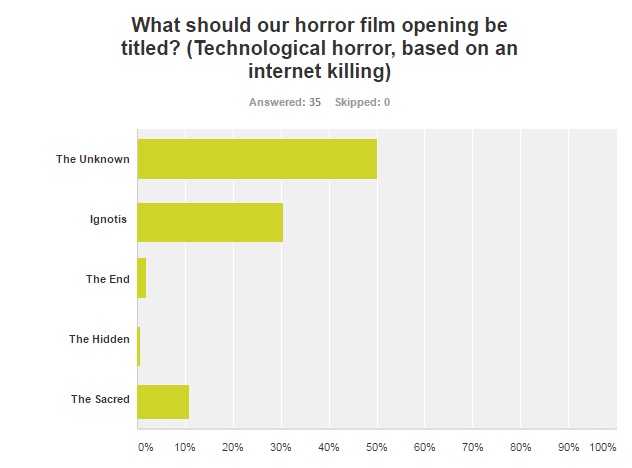
After doing intense research on what our film opening title would be, we conducted another quick survey on the website "Survey Monkey".


This was a great source as it helped us create a quick, easy and simple survey in which many people could answer. We chose this particular website as it allowed us to distribute the question extremely fast and the analytical feature allowed us to track the results when ever we received a new response.

Here are is the result:

From this, it is evident that the most popular title that fitted best with our film opening was "The Unknown". This piece of research helped us to then create a film title opening on Adobe After Effects. The result turned out like this:


Improvements


FOCUS GROUP - IMPROVEMENTS THAT NEED TO BE MADE


  • During the editing process of our film, we held a focus group to get some constructive criticism about our work and how we could improve.

  • We were told we had some strong footage but a major downfall for our group was the narrative of the film. Throughout the playing of the focus group we were frequently asked what was happening and why.

  • To ensure we didn't loose marks on our final piece, my group and I chose to meet up and film a few more scenes for the film, just clearing up the narrative, trying to make it obvious about what was going on as possible.

  • To conform to the blogger style in our movie opening, and to further make clear of the plot, we added a Youtube style framing to add to the mise - en - scene

  • We also decided to re-draw our story board to fit the changed storyline of the horror film. If you look further down the blog, you can see the changes we made from our original story board. 

  • We had to re-film some aspects of the opening due to the camera being out of focus in some places and also extremely shaky

  • We added in a computer generated voice - however this was another downfall to our strong ending of the opening. So we decided to get a character to record the voice which was much better. 


British Board of Film Classification - Age restrictions


British Board of Film Classification

What do they do?

The BBFC examines and age rates films and videos before they are released. 
They watch films and videos all the way through and award an age rating and BBFCinsight to each one. They then reach an age rating by applying the standards and criteria contained in the Classification Guidelines. 
Typically, two examiners view a film for theatrical release. In most cases a Senior Examiner will confirm the examiners’ recommendation. 
With our film opening being in the technological horror genre, it is clear that we have to distinguish the rating in which our movie should be. This will allow younger and more sensitive viewers to avoid watching the film opening. There are a range of ratings for horror movies, these include:

 Suitable for all - A U film should be suitable for audiences aged four years and over. However, it is impossible to predict what might upset a particular child, especially at this lower end of the category range.

Parental guidance - his means a film is suitable for general viewing, but some scenes may be unsuitable for young children. A PG film should not unsettle a child aged around eight or older. Parents should consider whether the content may upset younger, or more sensitive, children.
Cinema release suitable for 12 years and over - video works classified 12 contain material that is not generally suitable for children aged under 12. No one younger than 12 may see a 12A film in a cinema unless accompanied by an adult. Adults planning to take a child under 12 to view a 12A film should consider whether the film is suitable for that child
Video release suitable for 12 years and over  DIFFERENCE between the two- The 12A requires an adult to accompany any child under 12 seeing a 12A film at the cinema. The 12 is also a simpler system for retailers. It means they cannot sell or rent the item unless the customer is over the age of 12.
Suitable only for 15 years and over - 15 rated works are not suitable for children under 15 years of age. - movies rated this may include:

  •  strong violence
  •  frequent strong language (e.g. 'f***').
  •   portrayals of sexual activity
  •   strong verbal references to sex
Suitable only for adult - not suitable for those under 18 and may include:

  •   very strong violence
  •   frequent strong language (e.g. 'f***') and / or very strong language (e.g. ‘c***’)
  •   strong portrayals of sexual activity
  •   scenes of sexual violence
  •   strong horror
  •   strong blood and gore

After reviewing the types of ratings that we could give our  film opening, it was decided that we should place a 15 age restriction on our film opening. This is primarily due to the blood and use of weapons within film. These items could cause upset to younger views and therefore it is a good decision not to risk harm to young people. 


Tuesday, 19 April 2016

Lighting in our film opening


This is a screen shot from ''Unfriended' showing specific lighting. The lighting is mostly artificial coming from on screen objects like lamps and light bulbs. Since is a house, this sort of lighting is common in a technological horror. We tried to include lighting variations in each of our shots to ensure more marks.


This is a few shots from of our horror film that use artificial lighting. We tried to mirror the same sort of lighting from 'Unfriended' to capture the same conventions of lighting 


This shows lowkey lighting from the technological horror 'Stay Alive'. Lowkey lighting is the most common in the horror genre so we had to make sure we incorporated it into out horror film


This is a shot from our film that shows lowkey lighting to create an eerie atmosphere.


This is another shot from our horror film where we have used back lighting to illuminate our antagonist from the back.